
Send your bookings anywhere, the moment they happen.
A webhook is a message Reservics sends to a URL you choose whenever something happens to a booking. Instead of you checking the dashboard or exporting a CSV, Reservics pushes each event to your own tool the second it occurs.
Webhooks are available on the Advance plan. You will find them in Settings → Webhooks.
What you can use webhooks for #
- Keep your CRM or mailing list in sync. Every diner who books is added to Mailchimp, Klaviyo, HubSpot, FluentCRM or whatever you use, with their name, email, phone and the date they dined.
- Alert your team instantly. Send a Slack message, a WhatsApp message or an SMS to the floor manager the moment a table is booked or cancelled, in time to refill it.
- Keep the kitchen’s own sheet up to date. Push confirmed bookings into a Google Sheet or Airtable so whoever runs prep sees tomorrow’s covers without logging into the app.
- Automate the follow-up. Trigger a review request when a booking is completed, or your invoice flow when a deposit is paid.
- Feed your own reporting. Send bookings into your data warehouse, your accounting tool or your existing POS or ERP.
If you use Zapier, Make or n8n, you do not need a developer. Each of them gives you a “catch a webhook” step with a ready-made URL that you paste into Reservics.
Setting up a webhook #
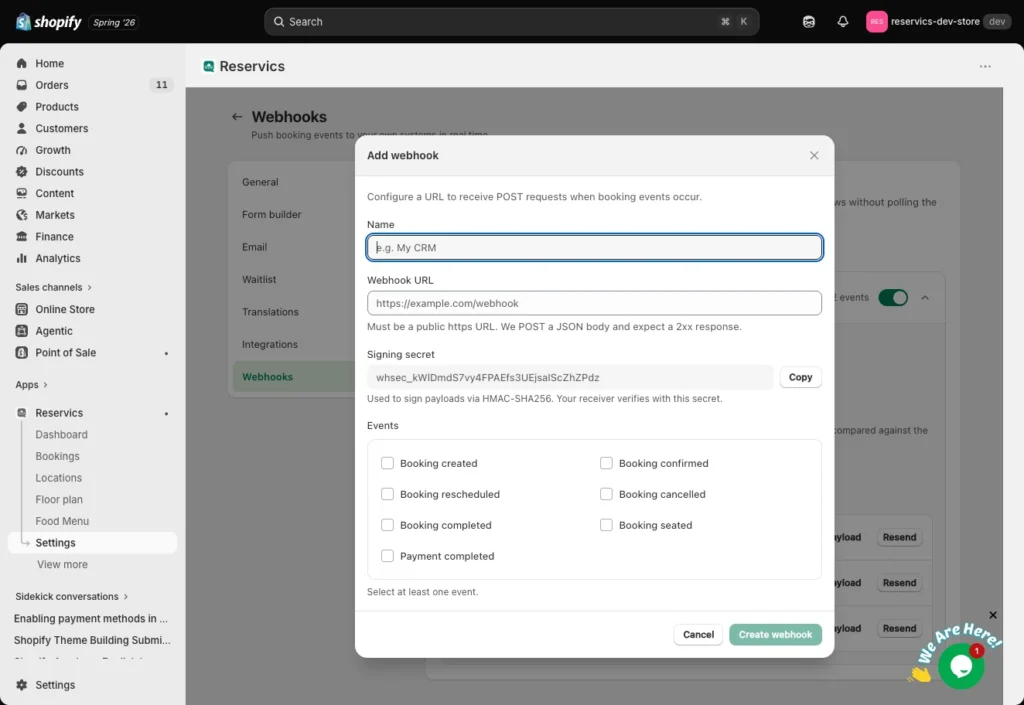
- Go to Settings → Webhooks and click Add webhook.
- Give it a name you will recognise later, for example “Mailchimp” or “Kitchen sheet”.
- Paste the webhook URL you want Reservics to send to. It must be a public
https://address. - Copy the signing secret shown in the dialog. You will need it if your receiver verifies signatures. You can reveal it again later.
- Tick the events this endpoint should receive. Only the events you tick are sent.
- Click Save, then click Send test to check your receiver accepts the request.
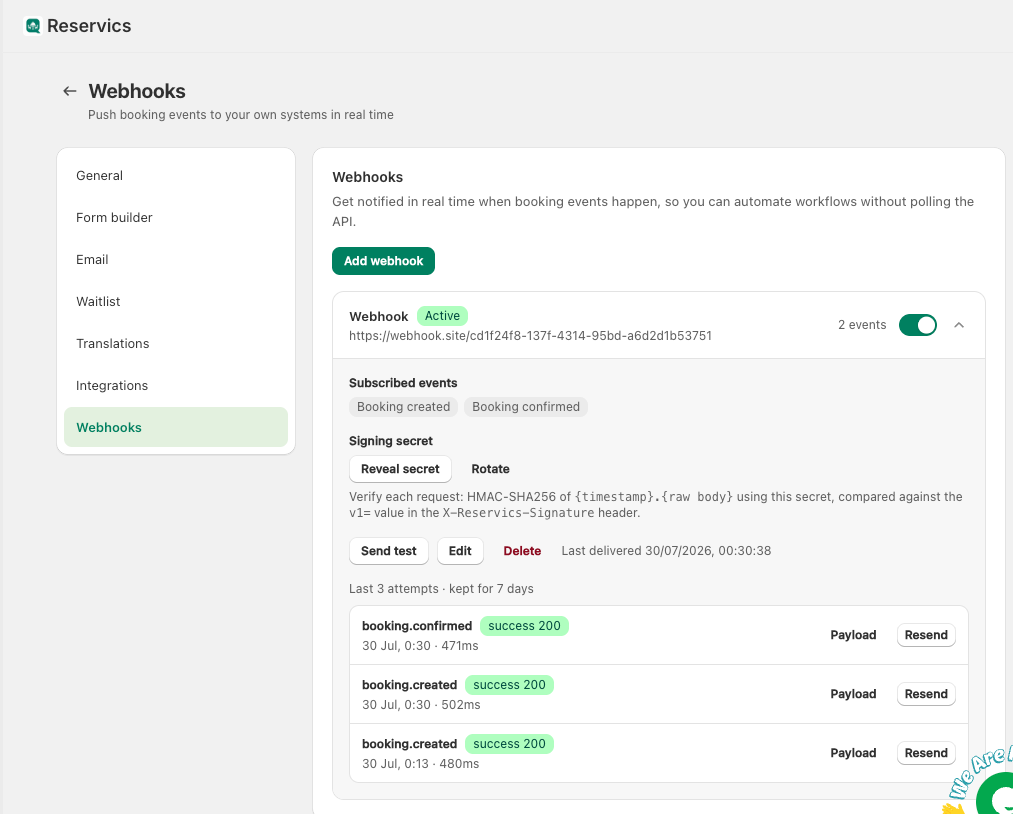
You can add as many endpoints as you like, each pointing somewhere different and each subscribed to a different set of events.
Getting a URL from Zapier, Make or n8n #
- Zapier: create a Zap, choose Webhooks by Zapier → Catch Hook as the trigger, and copy the custom webhook URL it gives you.
- Make: add a Webhooks → Custom webhook module and copy its address.
- n8n: add a Webhook node, set it to POST, and copy the production URL.
Paste that URL into Reservics, then press Send test so the tool captures a sample and you can map the fields.
Events #
| Event | Sent when |
|---|---|
booking.created | A new booking is made, from any source |
booking.confirmed | A booking becomes confirmed |
booking.rescheduled | The date or time of a booking changes |
booking.cancelled | A booking is cancelled, by you or by the diner |
booking.completed | A booking is marked completed |
booking.seated | A party is seated |
payment.completed | A deposit is paid |
Events fire no matter where the change came from: the admin dashboard, the storefront widget, the POS app, or an automatic status update.
What Reservics sends #
Reservics makes a POST request with a JSON body. Here is a full example:
{
  "id": "9f5b6b1e-4c1f-4f2c-9b1a-2f0c4c9c9f2a",
  "event": "booking.created",
  "created_at": "2026-07-30T18:05:11+00:00",
  "shop": "my-restaurant.myshopify.com",
  "data": {
    "booking": {
      "id": 1842,
      "code": "RSV-1842",
      "status": "confirmed",
      "date": "2026-07-31",
      "start_time": "19:30",
      "end_time": "21:00",
      "timezone": "Europe/Amsterdam",
      "party_size": 4,
      "customer": {
        "name": "Jane Doe",
        "email": "jane@example.com",
        "phone": "+31612345678",
        "shopify_customer_id": 7412589631
      },
      "location": { "id": 12, "name": "Central branch" },
      "table": { "id": 55, "label": "T7" },
      "deposit": {
        "amount": 25.0,
        "currency": "EUR",
        "paid": true,
        "refunded": false
      },
      "notes": "Window seat if possible",
      "custom_fields": [
        { "id": "occasion", "label": "Occasion", "value": "Birthday" }
      ],
      "cancellation_reason": null,
      "created_at": "2026-07-30T18:05:10+00:00",
      "updated_at": "2026-07-30T18:05:11+00:00"
    }
  }
}
Field notes #
idis unique per delivery. If you ever receive the sameidtwice, it is a retry of the same event. Use it to avoid creating duplicates.start_timeandend_timeare local to the location.timezoneis the location’s IANA timezone, so you can build an absolute timestamp from them.tableisnullwhen the booking has not been assigned a table.shopify_customer_idisnulluntil the diner has been mirrored into your Shopify customer list, or if that sync is off.custom_fieldscontains any extra questions you added to your booking form.- Test deliveries carry an extra
"test": truekey at the top level, so your receiver can ignore them instead of creating a real record.
The field names are a stable contract. New fields may be added over time, but existing ones are never renamed or retyped, so a mapping you build today keeps working.
For privacy reasons the diner’s cancellation link token is deliberately never included in a webhook payload.
Headers #
Every request carries these headers:
| Header | Meaning |
|---|---|
X-Reservics-Event | The event name, for example booking.created |
X-Reservics-Delivery | The unique delivery id, same as id in the body |
X-Reservics-Timestamp | Unix time in seconds when the request was signed |
X-Reservics-Signature | The signature, see below |
User-Agent | Reservics-Webhooks/1.0 |
Verifying the signature #
Anyone who learns your webhook URL could send requests to it. The signature lets your receiver prove a request really came from Reservics.
The header looks like this:
X-Reservics-Signature: t=1753900000,v1=6f1c...e93v1 is an HMAC-SHA256 hash of the string "<t>.<raw request body>", using your endpoint’s signing secret as the key.
To verify:
- Read
tandv1from the header. - Build the string
t + "." + rawBody. Use the raw body exactly as received, before any JSON parsing or re-encoding. - Compute HMAC-SHA256 with your signing secret and compare it to
v1using a constant-time comparison. - Reject the request if
tis more than a few minutes old, to block replays.
How your receiver should respond #
- Reply with any 2xx status code to mark the delivery successful.
- Reply quickly. Reservics waits 5 seconds to connect and 15 seconds for a response. If you have slow work to do, store the payload first and process it afterwards.
- Any other status code, or no response, counts as a failure.
- Redirects are not followed. If your URL redirects, for example from
httptohttpsor from a bare domain towww, point Reservics at the final address instead.
Retries and automatic disabling #
If a delivery fails, Reservics retries it up to 4 more times, waiting roughly 10 seconds, then 1 minute, then 5 minutes, then 30 minutes. A receiver that is briefly down usually recovers on the second attempt, and one that is down for a deploy still gets the event about 35 minutes later.
If an endpoint fails 10 events in a row, Reservics switches it off and shows a warning on the row, so a dead URL does not keep piling up. Fix the receiver, then switch the endpoint back on yourself. It is never re-enabled automatically.
The delivery log #
Expand any endpoint to see its recent deliveries: the event, the time, the status code, and the reason if it failed. Use it to answer “did that booking actually reach my CRM?” without guessing.
- Send test posts a sample booking to your endpoint so you can map fields before a real booking exists.
- Replay re-sends a past delivery once you have fixed your receiver, so nothing is lost.
Delivery records are kept for 7 days and then removed.
Managing the signing secret #
- Reveal secret shows the current secret again if you lost it.
- Rotate replaces it with a new one. Deliveries already sent keep the old signature, but the very next event is signed with the new secret, so update your receiver straight away.
Treat the secret like a password. Do not paste it into a public place.
Privacy #
Webhook payloads contain diner details, including name, email and phone. You choose the destination, so make sure it is a service you trust and that your own privacy policy covers it.
When a customer data erasure request comes through Shopify, Reservics also scrubs that diner’s details from any stored delivery records, not just from the booking itself.
Troubleshooting #
“Send test” fails immediately with a URL error.
The address is not a public https URL, or the hostname does not resolve. Check for typos and make sure the URL is reachable from the public internet.
Deliveries show a 3xx status.
Your URL is redirecting. Use the final address directly.
Deliveries show 401 or 403.
Your receiver is rejecting the request. If you verify signatures, check that you are hashing the raw body and not a re-encoded copy of the parsed JSON, and that you are using the right secret for that endpoint.
Deliveries time out.
Your receiver is taking longer than 15 seconds. Acknowledge the request first and do the slow work afterwards.
The endpoint switched itself off.
It failed 10 events in a row. Fix the receiver, send a test, then switch the endpoint back on.
Nothing arrives, but the log is empty.
Check that the endpoint is enabled and that the event you expect is ticked in its event list.


