
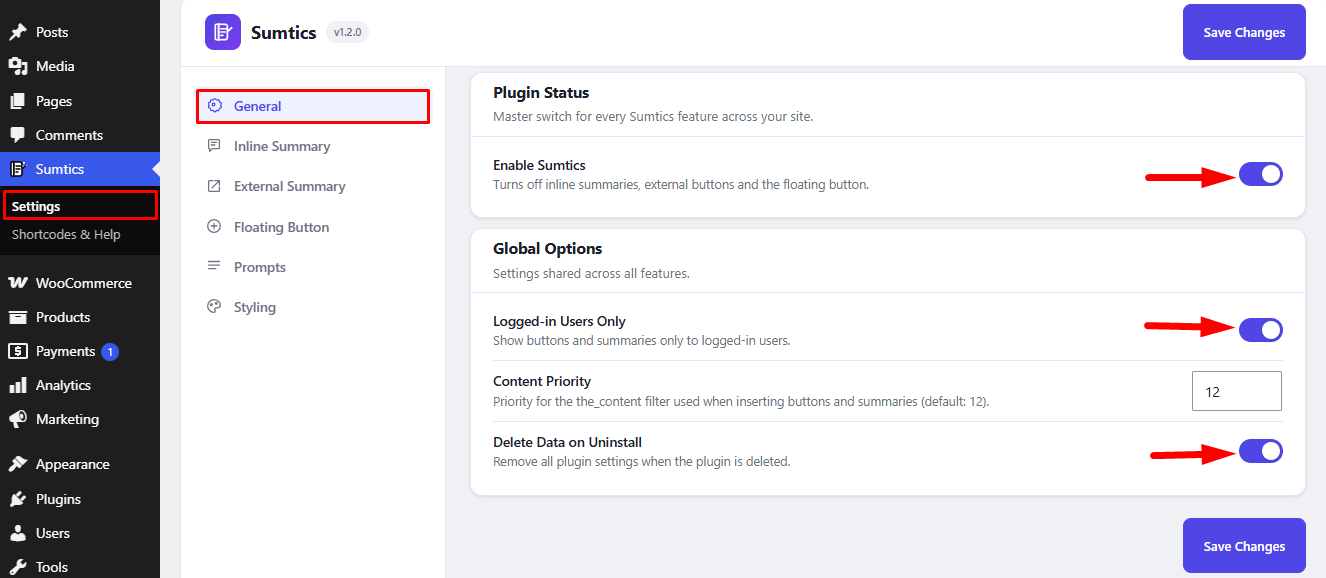
The General settings let you enable or disable Sumtics and configure global options that apply across all plugin features.
To access the General settings, navigate to: Sumtics → General
Enable Sumtics #
Enable the Enable Sumtics option to activate all Sumtics features on your website. When disabled, all plugin features—including the Inline AI Summary, External Summary Buttons, and Floating Button—will be turned off.
Global Options #
The Global Options section contains settings shared across all Sumtics features.
- Logged-in Users Only – Enable this option to display AI summaries and buttons only to logged-in users.
- Content Priority – Adjust the priority of the
the_contentfilter if you experience conflicts with your theme or other plugins. The default value is 12. - Delete Data on Uninstall – Enable this option to remove all Sumtics settings when the plugin is uninstalled.
After updating the General settings, click Save Changes to apply your changes across the plugin.


