
The Prompt Templates feature lets you customize the prompt sent to AI services when a visitor clicks an External Summary Button or the Floating Button. You can personalize the prompt, use dynamic variables, and set the default summary length for AI-generated responses.
To configure the Prompt Templates, navigate to: Sumtics → Prompts
Default Prompt #
The Default Prompt defines the instructions sent to the selected AI service. You can edit this prompt to control how AI generates summaries for your content.
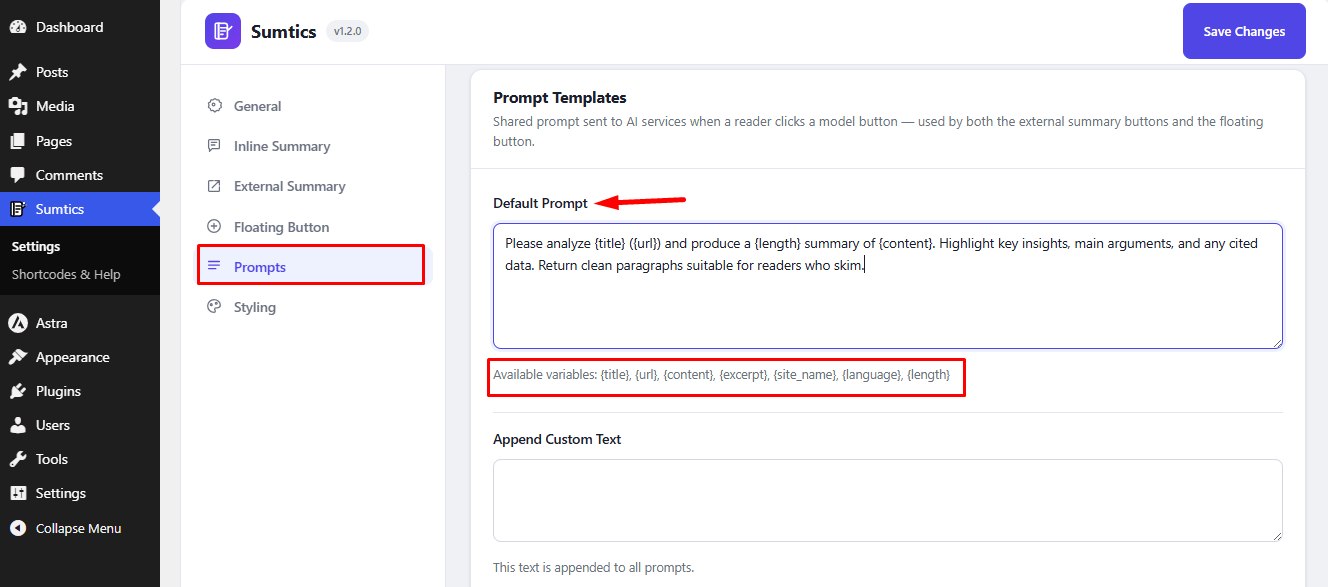
Sumtics supports the following dynamic variables, which are automatically replaced with content from the current page:
{title}– Post or page title{url}– Current page URL{content}– Full content{excerpt}– Post excerpt{site_name}– Website name{language}– Current language{length}– Selected summary length
Note: Do not remove these variables unless you want to customize how the AI receives your content.
Append Custom Text #
Use Append Custom Text to add extra instructions that will be included in every AI prompt, allowing you to customize the generated summaries.
Default Summary Length #
Select the default summary length (Short, Medium, or Long) to control the output generated by the AI services.


